Skip to the case study
All work

Case study: Deskivo Desk booking

For hybrid teams who need a desk, and a seat near their team. Designed and built end to end.

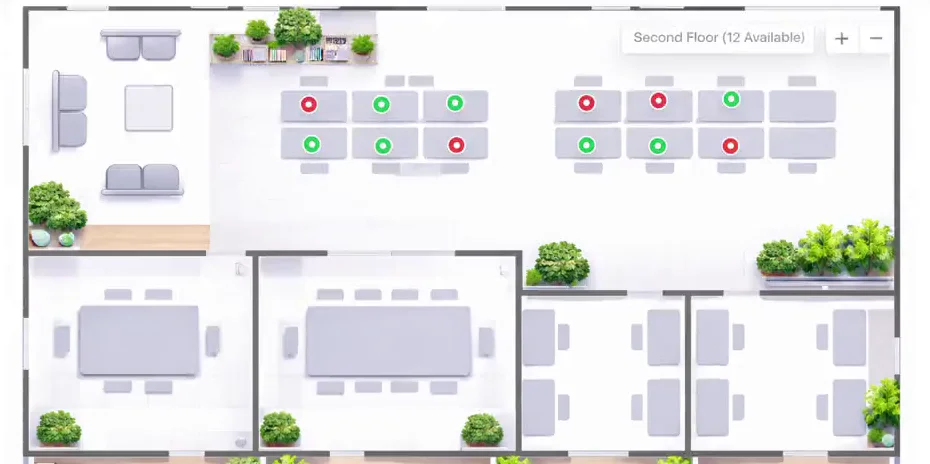
Deskivo’s interactive floor plan: an office layout with desks marked green where free and red where booked, meeting rooms and break areas.
The interactive floor plan · free desks green, booked red
My role

Design, interface, data model, authentication and deployment: built on my own, end to end.

Stack
  • Next.js
  • React
  • TypeScript
  • Prisma
  • PostgreSQL
  • Supabase
  • NextAuth.js
  • Tailwind CSS
  • Vercel
Key decisions
  • Admin access re-checked against the database on every request
  • Desk positions stored as percentages, so markers stay aligned at any zoom

The problem

In a hybrid office, nobody knows who is coming in. People arrive and can’t find a free desk, or end up on the other side of the floor from their team.

Admins had no simple way to say which desks exist, where they are, or who is using them.

What I built

A booking app built around the office itself. Users pick a date, see the floor as an interactive plan with free and booked desks marked, and reserve a desk in a few taps — for one day or a run of days. Desks booked by their own team are marked, so people can sit together.

My Bookings lists upcoming and past bookings and lets people cancel. Admins manage offices, floors and desks from a dashboard: they upload a floor-plan image and click to place each desk on it.

Full walkthrough · 21 seconds, no sound

How it holds up

Admin access is checked against the database, every time

Signing in issues a session token that lasts 30 days, and it carries the user’s role (USER or ADMIN). The admin API doesn’t trust that token’s copy of the role. On every admin request it reloads the user from the database and checks the role there, so an admin who is demoted loses access on their next request rather than when their token expires. Every admin endpoint goes through the same server-side check.

Desk positions survive any screen size

When an admin clicks to place a desk, its position is saved as a percentage of the floor-plan image’s width and height, not in pixels. The same plan then renders correctly on a phone, a laptop or zoomed in three times, without recalculating anything. Each desk marker is a real button with a label, so the plan works with a keyboard and a screen reader, not only a mouse.

The result

A working, deployed app: users can find and book a desk on an interactive plan, and admins can set up offices, floors and desks themselves, without touching code.

Technical details

For engineers: three decisions in the codebase, and what each one costs.

  1. Role check: database over token

    DecisionRe-read the user’s role from PostgreSQL on every admin API call instead of trusting the JWT.

    Trade-offOne extra database query on every admin request. Worth it so that removing someone’s admin rights takes effect on their very next request.

  2. Desk coordinates: percentages, not pixels

    DecisionStore each desk’s x and y as a percentage of the uploaded image, and render markers as absolutely positioned buttons.

    Trade-offNo canvas or SVG maths, and it scales for free — but positions assume the image keeps its proportions, so replacing a floor plan with a differently shaped image would misplace desks.

  3. The basics, done properly

    DecisionZod validation on booking and registration input, rate-limited sign-in and registration, security headers, and a daily keep-alive job so the free Supabase-hosted database never pauses.

    Trade-offThe rate limit lives in memory, so each server instance counts separately — fine at this scale, and the first thing to move to a shared store if traffic grew.